




Updated:
If you’re building a SaaS product in India using Supabase, you eventually face a serious infrastructure decision: should you self-host, or should you use managed hosting?
Most teams ask the same practical questions before production scale:
- Should you self-host Supabase for control?
- What does it actually cost on AWS Mumbai in 2026?
- Is 2GB RAM enough for production traffic?
- How many concurrent WebSocket connections can a small VPS really handle?
- What breaks when PostgreSQL is left at default settings?
- What security risks show up in the first 90 days of self-hosting?
This is not a marketing comparison. This is a production-grade infrastructure breakdown for Indian developers running real user traffic, auth flows, file uploads, and realtime subscriptions.
What Self-Hosting Supabase Actually Means
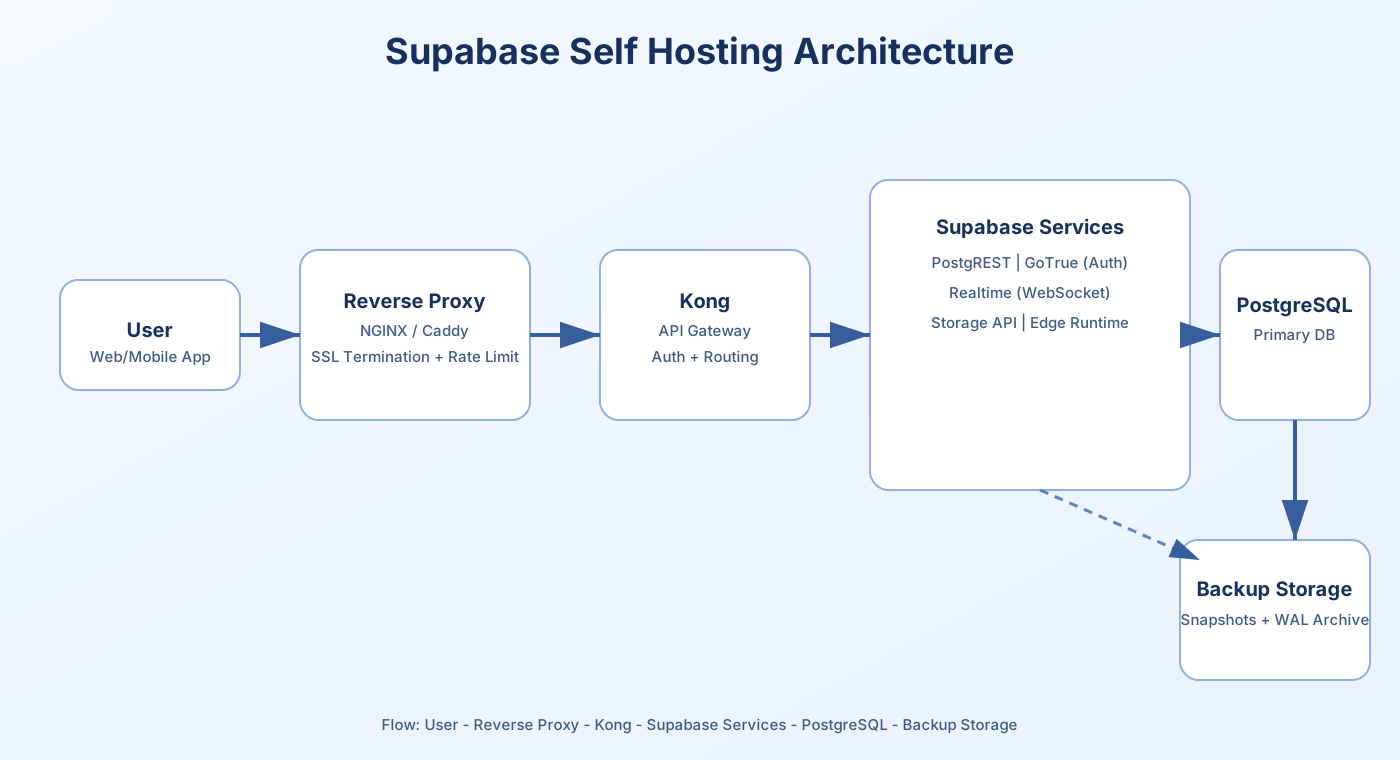
A production Supabase deployment is not just a database container. It is a multi-service backend platform that needs coordinated operations to stay reliable under load.
At minimum, a complete stack includes:
- PostgreSQL
- PostgREST
- GoTrue (Auth)
- Realtime server (WebSocket connections)
- Storage API
- Kong API gateway
- Reverse proxy (NGINX or Caddy)
- SSL management and cert renewal
- Firewall rules and ingress policy
- Backup automation and restore workflows
- Monitoring stack and alerting
Once this goes to production, you are responsible for operational outcomes, not just deployment success. That includes RAM tuning, shared_buffers sizing, WAL retention policy, disk IOPS planning, Docker networking, container restart policy, reverse-proxy hardening, and security patch windows.
None of this is optional if uptime matters.
Real Infrastructure Benchmarks (India Context)
WebSocket Latency (Measured Typical Ranges)
| Region | Avg Ping (India users) |
|---|---|
| AWS Mumbai (ap-south-1) | 10–20ms |
| Singapore | 60–90ms |
| US East | 180–250ms |
Realtime features like chat, collaborative dashboards, live notifications, cursor presence, and internal ops consoles start to feel slower once round-trip latency consistently crosses 80ms. The UI may still render, but user perception degrades because message acknowledgement and state sync feel delayed.
For Indian-first SaaS products, India-hosted infrastructure usually gives the most stable user experience because route variance is lower and cross-border dependency is reduced.
How Many Connections Can a VPS Handle?
Approximate concurrent WebSocket capacity for typical Supabase realtime workloads:
| RAM | Stable Concurrent WS |
|---|---|
| 2GB | ~80–120 |
| 4GB | ~200–350 |
| 8GB | 600+ |
These ranges assume no major query spikes and baseline hygiene:
- Postgres is tuned for memory and connections
- No memory leaks in app workers
- Container limits are set correctly
- No simultaneous heavy backup + analytics load
On 2GB VPS plans, memory exhaustion is common when realtime traffic overlaps with file operations, cron jobs, or backup compression. In that state, swap starts, request latency rises sharply, and Realtime/Auth can restart under pressure.
PostgreSQL Tuning Reality
Default PostgreSQL configuration is not production safe for most Supabase workloads. Reasonable tuning is required even at low scale.
Example baseline for 4GB RAM:
shared_buffers = 1GB
work_mem = 16MB
maintenance_work_mem = 256MB
effective_cache_size = 3GB
max_connections = 100
Without tuning, teams usually see the same failure pattern over time:
- Memory fragmentation during mixed query workloads
- Slow joins and rising p95 query latency
- Autovacuum lag and table bloat
- Uncontrolled WAL growth
- Disk queue pressure during backup windows
Impact of Disk IOPS on Supabase Performance
Supabase performance is disk-sensitive because PostgreSQL durability and WAL writes are I/O-bound under sustained load. Low IOPS storage can appear fine at first, then collapse under concurrent writes.
Low IOPS (100–300) commonly causes:
- Slower insert/update throughput
- Delayed replication and WAL shipping
- Backup lag and longer restore preparation
- Latency spikes during autovacuum and checkpoints
Practical recommendation:
- Target 3000+ IOPS for stable production behavior
- Prefer NVMe-backed storage over HDD
- Avoid burst-only disks for sustained workloads
Many starter cloud volumes are acceptable for dev but throttle under continuous write pressure. That is exactly when auth events, storage metadata, and application writes all compete for the same disk queue.
Real AWS Mumbai Cost Breakdown (2026 Estimate)
For a realistic production baseline, 4GB RAM is a safer starting point than 2GB for most apps with active auth and realtime usage.
| Component (ap-south-1) | Estimated Monthly Cost |
|---|---|
| EC2 t3.medium (4GB equivalent) | ~$32 (about INR 2700) |
| EBS 50GB gp3 | INR 900–1200 |
| Snapshots / backups | INR 400+ |
| Data transfer | INR 500–1500 (traffic-dependent) |
| Monitoring / observability tools | Additional |
Total realistic monthly cost for self-hosting usually lands around INR 4000–6000 before counting engineering time.
That total still excludes:
- DevOps setup and maintenance hours
- Incident debugging and postmortem time
- Security patch management
- Recovery drill execution
For small teams, time cost often exceeds raw compute cost within a few months.
Example Self-Hosting Docker Snippet
Minimal Compose layout (illustrative only):
version: '3.7'
services:
  db:
    image: supabase/postgres
    restart: always
    environment:
      POSTGRES_PASSWORD: securepassword
    volumes:
      - db_data:/var/lib/postgresql/data

  kong:
    image: kong
    restart: always

volumes:
  db_data:
This snippet is intentionally minimal. Production still requires SSL termination, reverse-proxy policy, backup jobs, monitoring, secrets management, and container resource limits.
Basic UFW Hardening Example
ufw default deny incoming
ufw allow 22/tcp
ufw allow 443/tcp
ufw enable
Never expose PostgreSQL on 5432 publicly. Keep DB access private and restricted to trusted network paths.
How Self-Hosting Breaks in Real Scenarios
These are common production incidents seen in self-hosted Supabase setups:
- Memory spikes: OOM killer terminates containers and Realtime/Auth restarts.
- SSL expiry: cert renewal fails and API endpoints become unreachable.
- Outdated images: known vulnerabilities remain unpatched for weeks.
- No WAL archiving: point-in-time recovery is impossible during data incidents.
- Rate-limit gaps: flood traffic collapses gateway resources.
None of these failures are rare. They usually happen during growth phases, feature launches, or marketing traffic spikes when teams are least ready for infra firefighting.
How Attackers Target Self-Hosted Servers
Publicly reachable infrastructure receives automated probing continuously. Common patterns for exposed stacks include:
- SSH brute-force attempts
- Open Postgres port scanning
- Credential stuffing on auth endpoints
- WebSocket flood traffic
- Disk-filling and CPU exhaustion attempts
- Exploitation of stale container versions
If image patch cycles slip for 3–4 months, the risk surface expands quickly. Supabase components evolve fast, and delayed updates increase exposure window.
Minimum hardening baseline should include strict ingress policy, fail2ban or equivalent controls, rate-limits, key rotation policy, backup encryption, and periodic restore drills.
When Self-Hosting Makes Sense
- You already have DevOps depth and on-call coverage
- You need deep infra customization or private network topology
- You operate high scale with dedicated platform ownership
- You require workload-specific tuning beyond standard managed plans
- You can absorb operational overhead without slowing product delivery
If your team meets these conditions, self-hosting can be a strong choice.
When Managed Hosting Makes More Sense
- You are early-stage and shipping features quickly
- You want predictable monthly cost and lower incident risk
- You need migration support from Supabase Cloud
- You want RAM-isolated VPS with pre-hardened baseline
- You want monitoring + backups handled operationally
Explore managed infrastructure options through Managed Supabase Hosting India when you want operations handled end-to-end.
Keep a validated migration checklist ready before cutover so auth, storage, and realtime flows are verified end-to-end.
Regional routing behavior should be evaluated alongside hosting costs before finalizing your production architecture.
Ready to Avoid Self-Hosting Risks?
If your team wants production-ready Supabase infrastructure without maintaining every low-level ops layer, managed hosting reduces operational drag and incident exposure.
You avoid repeated work around:
- Memory tuning and swap incidents
- Firewall and reverse-proxy hardening
- Patch cadence management
- Backup validation and restore testing
- SSL renewal troubleshooting
Start here with dedicated Supabase VPS plans if you want predictable performance without daily infrastructure maintenance.
Operational Runbook Checklist (Production Minimum)
Whether you self-host or use managed infrastructure, write an explicit runbook and treat it as part of the product. Teams usually underestimate this until the first outage.
A practical minimum checklist should cover:
- Daily backup verification and retention visibility
- Weekly restore test on isolated environment
- Container/image patch cadence and rollback notes
- Alert thresholds for CPU, RAM, disk, queue depth, and p95 latency
- Clear on-call ownership and escalation path
- Incident timeline template for postmortems
Example alert thresholds often used for early-stage SaaS:
- CPU sustained above 75% for 10 minutes
- RAM above 85% with swap activity
- Disk utilization above 80%
- Failed auth requests above baseline rate
- WebSocket disconnect rate exceeding normal churn
These are starting points, not universal values. Tune thresholds using your own traffic profile.
Migration and Cutover Strategy (Cloud to India VPS)
If you are moving from Supabase Cloud to India-hosted infrastructure, minimize risk with a controlled cutover process instead of a single blind switch.
- Take a verified database export and checksum it.
- Restore to target environment and validate extensions, functions, and RLS behavior.
- Sync storage objects and check public/private path parity.
- Run smoke tests for auth, CRUD APIs, realtime channels, and webhook flows.
- Schedule cutover during lowest-traffic window.
- Keep rollback variables and previous endpoint config ready for 24 hours.
Example environment switch in application deployment:
SUPABASE_URL=https://new-project.domain
SUPABASE_ANON_KEY=xxxxxxxx
SUPABASE_SERVICE_ROLE_KEY=xxxxxxxx
Keep a staged rollback path documented during migration windows for safer production cutovers.
Supabase Resources
- Supabase Hosting India
- Supabase Migration Guide: Supabase migration guide
- Supabase India Outage Analysis: India Supabase outage analysis
- Self-Hosting vs Managed Comparison
FAQs
Is 2GB enough for Supabase?
Yes for MVP workloads (typically under 5k DAU and low concurrency). It is not recommended for sustained growth, heavy realtime sessions, or frequent background jobs.
Is AWS cheaper than managed VPS?
Usually not after adding storage, snapshots, transfer, monitoring, and engineering maintenance time. Raw instance price alone is a misleading comparison.
Does IOPS affect Supabase?
Yes. PostgreSQL and WAL are disk-sensitive. Low IOPS can increase write latency, backup lag, and throughput instability under sustained load.
Can I migrate from Supabase Cloud?
Yes. Export database, restore into target environment, sync storage, switch environment variables, and validate before final cutover.
Conclusion
Supabase is a powerful backend platform. The decision is not about whether Supabase is good; it is about who owns infrastructure operations and risk.
Self-hosting gives maximum control, but it requires disciplined execution across security, reliability, and performance engineering.
Managed hosting gives product teams focus: fewer infra interruptions, clearer cost planning, and faster delivery velocity.
If your users are in India, local infrastructure placement and routing stability are strategic advantages, not minor optimizations.
Supabase Infrastructure Links
For deployment planning and migration support, explore these core service resources:
Need Production Support?
Deploy managed infrastructure and skip setup friction
Cloudrifts handles infrastructure, security hardening, backups, and support so your team can stay focused on product work.